
New User Onboarding
Problem
Olive’s customer-facing app distribution product Olive Helps was 2 years old and needed an update to the onboarding process. This was also my first project for this product and good example of collaborating while learning on the fly.
My Role: Lead UX Designer, Previous UX Lead
Collaborators: Sr & Jr Project Manager, Engineering Team
Stakeholders: VP of Product
The Solution
The goal was to make sure that we introduced key features to users in a way that also helped them gain familiarity with the product navigation. This was also an opportunity to refine the old experience and get rid of complicated jargon that’s not relatable for our nontechnical end users.
Process
Collaboration
UX worked with Product to gather requirements for the onboarding. The previous UX designer was in the process of offboarding and was showing me around the files and how they approached the previous onboarding process. (shown to the left)
I worked to understand the product features and used my own experience to build out the flow for users. Engineering worked with me to understand what is feasible and development limitation. They also helped me see that there were other opportunities.
I also showed product great examples of onboarding/walkthrough experiences that would be comparable to our use case. I gave them Trello and Optimal Workshop as good examples of what we were trying to accomplish.
Results
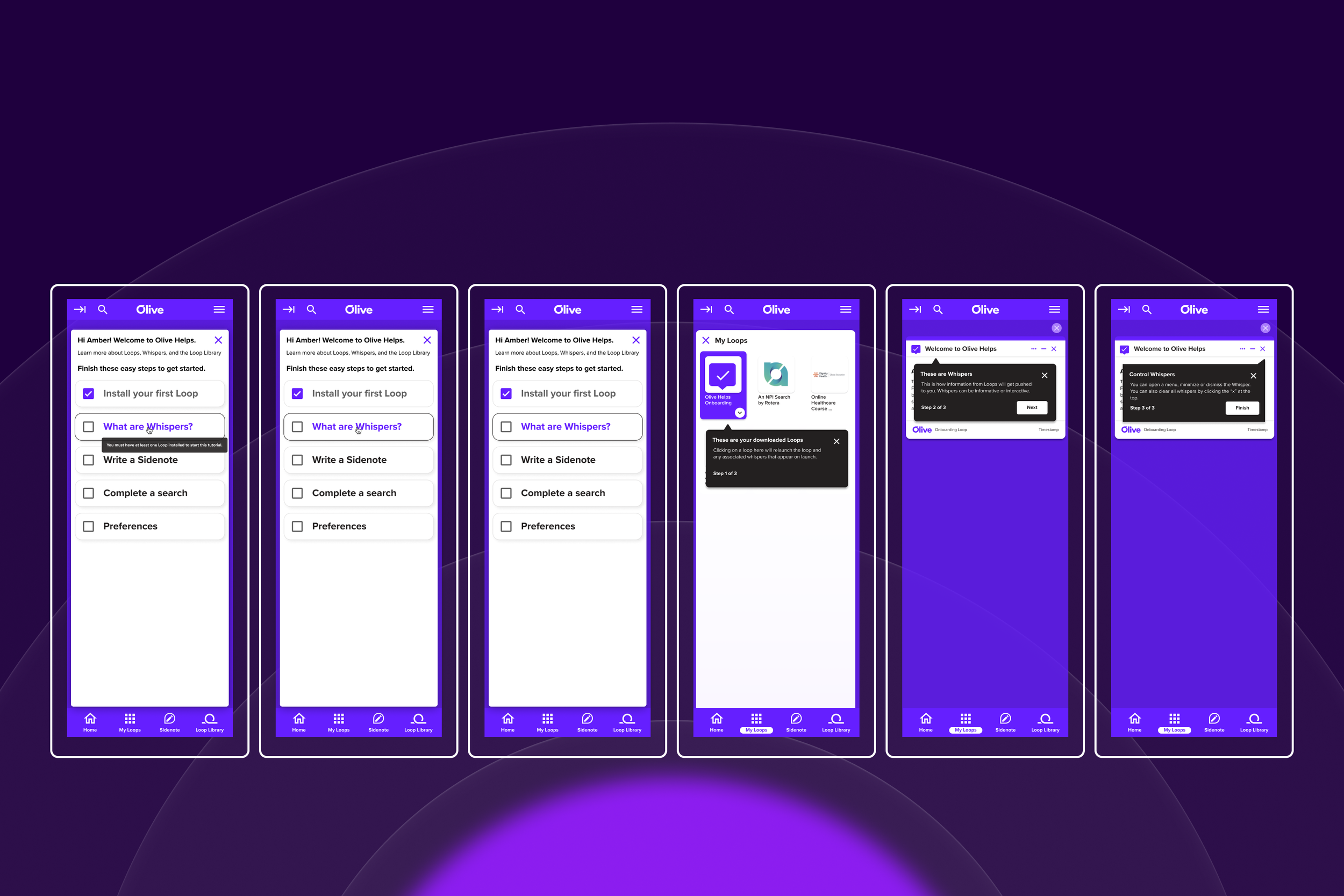
We created an onboarding experience that lets users go through a step by step process. They have the option to enter or exit onboarding as they wish and we kept it informational. Due to the nature of the product , some of the applications do not utilize all the features we included. So UX worked with engineering to create a special onboarding app that users could download for the sake of the tutorial.
This redesign captures new features that weren’t included previously.
Is a more sustainable onboarding process that can grow and as we continue to develop the product.
Is less in danger of being out of date than the previous experience.
UX Recommendations
Placement based on Best Practices
Keep the onboarding static. Place it where new users will be able to see it, but it should be able to revisit and dismiss as necessary.
Don’t force users through the process
Since old users would be exposed to the onboarding tutorial, UX made the recommendation that users would not be prompted to complete the tutorial. We would track for users if they completed each section, but it wasn’t required for them to complete it.
Develop an onboarding applet that would allow users to see the full functionality of the product.
Some applets do not utilize all the features. UX and Engineering teamed up to create an applet that could help users navigate through all the features, like relaunching an applet or getting a notification (known as whispers)